Grow a Garden is probably one of the most unique experiences on Roblox. Unlike anime-themed experiences like Blue Lock Rivals or survival experiences like Hunty Zombie, this game tasks you with growing the biggest garden that you can to make the most money possible. You buy seeds and pets, then sell your crops for money.
The game doesn’t have a steep learning curve, but the free Grow a Garden codes can definitely make your life easier, especially during the initial few moments in the game. So, here’s a quick rundown of all the active Grow a Garden codes and how you can claim them.
All Active Codes in Grow a Garden
You can redeem the following codes in Grow a Garden in Roblox. Keep in mind that these codes are case-sensitive, so be very careful when entering them; otherwise, they may not work at all.
- RDCAward: Redeem for 1x RDC Award cosmetic
- BEANORLEAVE10: Redeem for 1x Green Bean Chamber cosmetic
These are the only active codes available as of September 2026, and you can still claim the rewards associated with them. However, although these codes come with an expiry date, the developers don’t announce when they will expire, so be sure to claim them as soon as you can.
If you’re tired of playing passive games, then be sure to check out the free codes for Volleyball Legends and Basketball Zero. Both experiences are available for free on the platform and are inspired by popular anime.
How to Redeem Free Codes in Grow a Garden
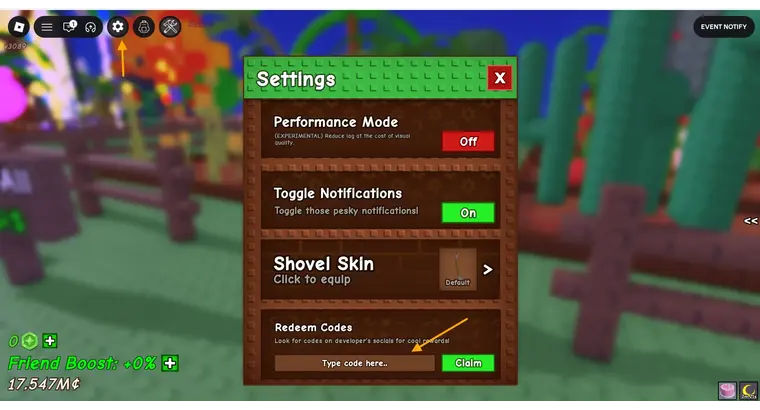
Unlike various other experiences like Anime Vanguard or Jujutsu Infinite, the section where you can claim the Grow a Garden codes is tucked away neatly in the settings. So, it’s going to be difficult to find if you don’t know what you’re looking for. So, here’s how you do it.
- Once you’re in the Grow a Garden experience, click on the settings button. It looks like a cogwheel and can be found in the top left corner of your screen.
- When you click on that, it should bring up a new box with a lot of settings options. Keep scrolling down through the list till you come to a box where you can enter the codes mentioned above.
- Copy the code from our list, paste it into the box, and hit the confirm button.
How to Get More Codes For Grow a Garden
If you’re looking for more codes, the easiest way to find them is on our page. So, be sure to bookmark it and check back frequently to see if the developers have released new codes that you can use. We update our page regularly so that you have access to the latest information that can make your gameplay easier.
However, if you want to do all the heavy lifting yourself, be sure to join the official Grow a Garden Discord channel. Whenever there’s a new update, the developers release fresh codes which can often be found in the announcements channel. So, be sure to check in there if you’re looking for a free code or two. Unfortunately, the game doesn’t come with a lot of redeem codes like other Roblox experiences, but making money isn’t too difficult or time-consuming, so you won’t have a very difficult time growing fruits and vegetables.
Expired Grow a Garden Codes
- torigate
- LUNARGLOW10
Why Are My Grow a Garden Codes Not Working?
There are a few reasons why your Grow a Garden codes aren’t working. These reasons are as follows:
- There’s a typo in the code that you’re trying to use.
- The code you want to use has expired.
- You’ve already claimed that code before.
While there’s no particular solution for the final issue, the first two can be solved if you’re using only the free Grow a Carden codes mentioned in the active codes section. Once a code expires, we move it to the expired codes section for easier understanding. Additionally, always copy the codes from our page and paste them into the game. We carefully verify these codes, so by copying them from our page, you avoid the risk of making any typos.
You can also find other Roblox Codes to redeem here. Additionally, if you’re looking for some of the best Roblox games, we’ve got you covered!